General Tab
Configure core translation behavior — languages, auto-translate, SFX, and advanced options.
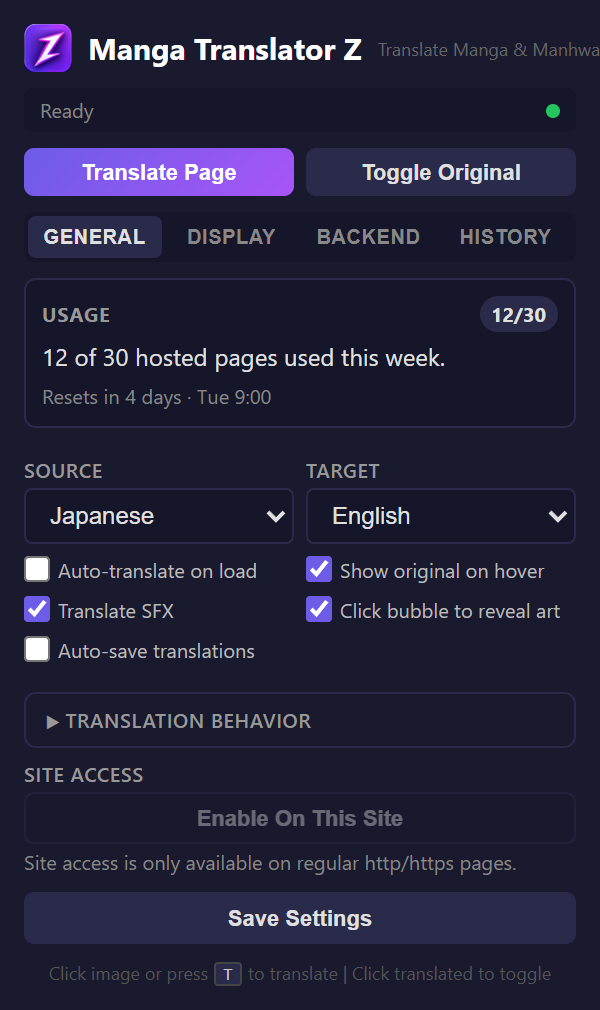
Usage / Quota
At the top of the General tab, a card shows your remaining usage quota. For BYOK (Bring Your Own Key) OpenAI users, this shows "Unlimited" since you pay OpenAI directly. For hosted server users, it shows remaining pages and quota limits.
Language Settings
- Source language — Japanese, Korean, Chinese, or Auto-detect
- Target language — English, Spanish, Portuguese, French, German, Russian, Indonesian
Translation Options
| Option | Default | Description |
|---|---|---|
| Auto-translate | Off | Automatically translate pages on load |
| Show original on hover | On | Tooltip with original text on hover |
| Translate SFX | Off | Include sound effects in translation |
| Click-to-toggle bubble | On | Click bubbles to show/hide translation |
| Auto-save | Off | Automatically save translated pages as JPEG |
Advanced Section
| Option | Default | Description |
|---|---|---|
| Multi-page context | On | Maintain translation context across pages |
| Reading direction | Auto | Auto, RTL (right-to-left), or LTR |
| Tone | Natural | Natural, Literal, or Punchy translation style |
| Prefetch pages | 0 | Number of pages to pre-translate ahead |
| Glossary | Empty | Custom terminology for consistent translations |
Save Folder
When auto-save is enabled, specify a folder name for organizing saved translations. Files are saved to your browser's Downloads directory within this folder.